


Looking for the Best Monitor for Your MacBook? Here’s Why the BenQ MA Series Is Worth Considering


Editor’s Note: Some images in this article were generated with the assistance of AI for illustrative purposes.
A MacBook works brilliantly on its own, but if it has become your main machine for work, creative projects or everyday productivity, adding the right external monitor can make a significant difference.
The challenge is finding a monitor that actually feels right with a Mac.
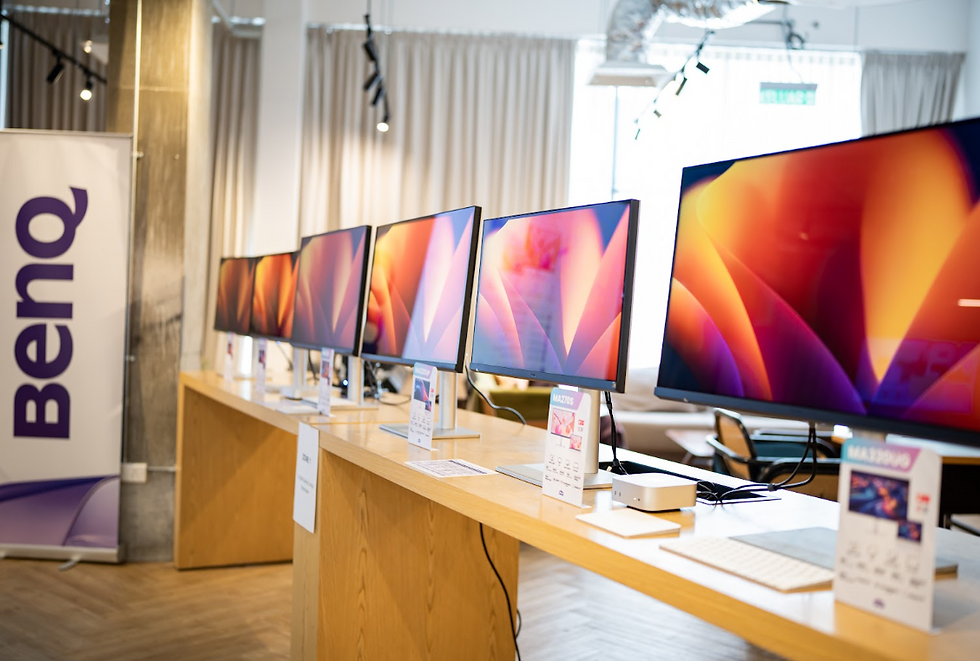
The BenQ MA Series is designed specifically for MacBook users, combining 4K resolution, Mac colour tuning, USB-C connectivity and macOS-friendly display controls. For different desk setups and viewing preferences, the BenQ MA320U offers a larger 32-inch Nano Matte display, while the BenQ MA270UP provides a more compact 27-inch Nano Gloss experience.
Instead of simply asking which monitor has the biggest specification numbers, MacBook users should consider how well an external display fits into their existing Mac workflow.
From colour consistency and screen finish to USB-C charging and software integration, here are some of the most important things to consider when choosing a monitor for your MacBook.
What Should You Look for in a Monitor for MacBook?
A good external monitor for a MacBook should ideally solve several problems at once.
You want more screen space without sacrificing sharpness. You want colours that do not look completely different when moving content between displays. You probably want USB-C so your desk is not buried under cables. And if you regularly work between the MacBook display and your external screen, convenient software integration can make the entire setup feel more cohesive.
This is where the BenQ MA Series takes a distinctly Mac-focused approach.
Both the MA320U and MA270UP feature 4K UHD resolution at 3840 x 2160, wide P3 colour coverage, M-book Mode, USB-C Power Delivery and support for BenQ Display Pilot 2.
They share the same general philosophy, but offer different screen sizes and finishes to accommodate the way different Mac users work.

Why Colour Consistency Matters When Choosing a Monitor for Mac
One of the first things you may notice after connecting a generic monitor to a MacBook is that the two displays do not necessarily look alike.
Whites can have different colour temperatures. Images may appear more saturated on one display than another. A photograph that looks natural on the MacBook might appear noticeably warmer or cooler when moved onto the external monitor.
For general productivity, this can be distracting. For photographers, designers, video editors and content creators, colour inconsistency can become a much bigger concern.
BenQ developed the MA Series around its Mac Color-Tuning Technology, with the aim of delivering colours that remain visually consistent when extending a MacBook onto a larger display. The monitors also include M-book Mode, designed specifically around the Mac viewing experience.
Both models also support wide P3 colour.
The 32-inch MA320U covers 97% P3 and 99% sRGB, while the 27-inch MA270UP covers 95% P3 and 99% sRGB.
That makes the MA Series particularly relevant for users who frequently move photos, videos, graphics and other visual content between their MacBook and external monitor.
Matte or Glossy: Which Monitor Finish Is Better for Your MacBook Setup?
Choosing between a matte and glossy monitor is not simply about which one looks better. Your desk environment and personal viewing preference matter just as much.
This is also one of the clearest differences between the two BenQ MA models featured here.
BenQ MA320U: A 32-inch Nano Matte Monitor for Larger Workspaces
The BenQ MA320U features a 31.5-inch 4K IPS Nano Matte display. Its matte surface is designed to reduce distracting reflections, which can be especially useful in offices and home workspaces with windows, overhead lighting or other bright light sources around the screen.
Its larger 32-inch class display also provides plenty of physical screen space for multitasking.
Think large spreadsheets, multiple browser windows, editing timelines, reference materials and communication apps all sharing the same desktop.
For someone using a MacBook as the centre of a permanent workstation, the additional screen real estate can make a substantial difference.
The MA320U offers a typical brightness of 550 nits, up to 600 nits peak HDR brightness, VESA DisplayHDR 600 support and a 1300:1 native contrast ratio.

BenQ MA270UP: A 27-inch Nano Gloss Monitor for a More Compact Setup
The BenQ MA270UP, meanwhile, uses a 27-inch 4K IPS Nano Gloss panel.
The Nano Gloss surface is aimed at users who prefer the clarity, depth and polished visual presentation associated with a glossy display. BenQ describes the Nano Gloss surface gives the display a more vibrant and polished visual appearance, with strong contrast and clear image presentation.
At 27 inches, it also works particularly well for smaller desks and home offices where a 32-inch monitor might simply take up too much space.
Despite its smaller footprint, the MA270UP still offers a full 3840 x 2160 4K resolution, giving it a pixel density of 163 PPI. It also reaches 450 nits brightness and carries VESA DisplayHDR 400 support.
Rather than viewing the MA320U and MA270UP as direct competitors, it makes more sense to consider them as two approaches to the same Mac-focused desktop experience.
Want a bigger canvas and a matte surface to minimise reflections? The MA320U fits that environment.
Prefer a smaller 27-inch display and the visual character of a glossy screen? That is where the MA270UP comes in.
Is a 27-inch or 32-inch Monitor Better for MacBook?
There is no universally correct monitor size for a MacBook.
A 27-inch 4K monitor is an excellent middle ground for many desks. It provides substantially more workspace than a laptop screen without requiring an especially deep or wide desk.
That makes the MA270UP a natural fit for bedrooms, home offices, studio apartments and hybrid workspaces.
A 32-inch 4K monitor, on the other hand, prioritises physical workspace.
The MA320U gives users more room to spread out applications, which becomes particularly useful for video editing, design applications, large spreadsheets, research and workflows involving multiple windows.
The best choice ultimately depends on how much desk space you have and how much information you want visible at once.
For MacBook users, both sizes offer another advantage: the ability to use the MacBook as the portable computer you take everywhere, then connect it to a much more spacious desktop environment when you sit down to work.
Why USB-C Is Important for a MacBook External Monitor
If you are building a clean MacBook desk setup, USB-C is one feature worth prioritising.
Both the BenQ MA320U and MA270UP support an all-in-one USB-C connection with up to 90W Power Delivery. This allows a compatible MacBook to transmit its display signal while receiving power through the same cable.
Instead of connecting your MacBook charger and a separate display cable every time you sit down, you can connect the laptop directly to the monitor.
One cable handles the display connection and charging.
Both monitors also provide a second downstream USB-C connection capable of delivering up to 15W, alongside additional USB connectivity.
For people who regularly carry a MacBook between home, work and meetings, that seemingly small convenience can make a desktop setup feel considerably more streamlined.
Connect the MacBook, start working, then disconnect one cable when it is time to leave.

A Mac Monitor Should Work With macOS, Not Just Connect to It
Physical connectivity is only one part of the experience.
BenQ's Display Pilot 2 software is another reason the MA Series feels more purpose-built for Mac users.
Display Pilot 2 allows compatible BenQ monitors to be managed from the desktop and provides functions including brightness and volume control using a Mac keyboard, input switching, desktop partitioning and ICCsync.
That means you do not always have to reach for physical monitor controls just to make a basic adjustment.
ICCsync is particularly useful for colour workflows. It synchronises the corresponding ICC profile between the operating system and monitor when supported colour modes are selected, helping simplify colour management.
BenQ currently lists both the MA320U and MA270UP among the models supported by Display Pilot 2.
These integrations may not sound as exciting as resolution or brightness numbers, but they address something arguably more important for everyday use: making an external display feel like part of the Mac workflow rather than an unrelated screen connected beside it.
Don't Overlook Ergonomics When Building a MacBook Workstation
An external monitor is something you may look at for eight hours a day, so positioning matters.
Both the MA320U and MA270UP include adjustable stands offering 115mm height adjustment, tilt, swivel and 90-degree pivot functionality.
That makes it easier to position the display according to your desk height, chair and preferred viewing position rather than adjusting your posture around a fixed screen.
Both monitors also support 100 x 100mm VESA mounting, giving users the option of moving to a monitor arm or alternative mounting solution later.
For a permanent MacBook workstation, these details can matter just as much as the display specification itself.
Which BenQ MA Monitor Makes Sense for Your MacBook Setup?
Instead of asking whether the BenQ MA320U or MA270UP is "better," ask what type of workspace you are trying to build.
If you want a large 32-inch 4K monitor for MacBook, regularly multitask across several applications, or work in an environment where reflections can become distracting, the BenQ MA320U and its Nano Matte display make a compelling combination.
If you prefer a more compact 27-inch 4K monitor for MacBook and enjoy the visual character of a glossy screen, the BenQ MA270UP and its Nano Gloss display offer a different interpretation of the same Mac-centric philosophy.
What they have in common is arguably more important than what separates them.
Both are designed around MacBooks. Both provide 4K resolution, P3 colour coverage, Mac-specific colour tuning, M-book Mode, Display Pilot 2 integration and USB-C connectivity with up to 90W Power Delivery.
That makes the BenQ MA Series particularly interesting for users who are not simply looking for another screen, but for an external monitor that complements the way they already use their Mac.
BenQ MA Series - https://benqurl.biz/3SV2Cnj
BenQ Shopee - https://benqurl.biz/4y3UW17
—------------
Frequently Asked Questions About Monitors for MacBook
Is the BenQ MA Series designed for MacBook?
Yes. The BenQ MA Series is specifically positioned as a monitor range for MacBook users, with Mac Color-Tuning Technology, M-book Mode, P3 colour support, USB-C connectivity and Display Pilot 2 integration.
Can the BenQ MA320U charge a MacBook through USB-C?
Yes. The BenQ MA320U supports USB-C Power Delivery of up to 90W, allowing compatible MacBooks to receive power while connected to the monitor through USB-C.
Can the BenQ MA270UP charge a MacBook through USB-C?
Yes. The BenQ MA270UP also supports up to 90W USB-C Power Delivery, enabling a single USB-C connection for video, data and MacBook charging with compatible devices.
Should I choose a matte or glossy monitor for MacBook?
A matte monitor can be preferable if your workspace has significant ambient light or reflections, while a glossy monitor may appeal more to users who prioritise visual clarity, contrast and a polished screen appearance.
Within the BenQ MA Series, the MA320U uses a Nano Matte panel, while the MA270UP uses Nano Gloss.
Is a 27-inch or 32-inch monitor better for a MacBook?
A 27-inch monitor generally works well for compact desks and everyday productivity, while a 32-inch monitor provides more physical workspace for multitasking, creative applications and larger desktop setups.
The BenQ MA270UP offers a 27-inch 4K display, while the MA320U offers a 31.5-inch 4K display.
A Better External Display Experience for MacBook Users
The best monitor for a MacBook is not necessarily the one with the longest specification sheet.
It is the one that fits naturally into the way you already use your Mac.
That means having enough resolution and screen space for your workflow, colours that remain consistent across displays, straightforward USB-C connectivity and controls that do not feel foreign when you move away from the MacBook screen.
The BenQ MA Series addresses those requirements from a distinctly Mac-first perspective.
With the MA320U, users get a spacious 32-inch 4K Nano Matte display suited to larger workstations and reflection-conscious environments. With the MA270UP, users get a compact 27-inch 4K Nano Gloss display for those who prefer a glossy presentation.
Different screens. Different workspaces. The same objective: making the transition from a MacBook to a full desktop setup feel as seamless as possible.
For MacBook owners looking to expand their workspace without losing the familiar qualities of the Mac experience, the BenQ MA Series is well worth considering.


Comments